

Homeschool Preschool
Backstory: My current homeschool method is a whole-lifestyle approach – I gently and intentionally begin educating my children as early as possible. The keywords here are “gently and intentionally”.
This was not always the case; I made some mistakes in the early years. Our oldest was doing daily *seatwork* before age four! I eventually realized that insisting on textbooks (with handwriting) at a young age was more harmful than helpful. He was burnt out, stressed out, and dreaded his seatwork. I wanted him to love learning, so I decided to stop having him write anything until an older age (except his name and numbers)

I continued teaching him, but we did all areas of language arts verbally and used alternative methods to teach other subjects, such as hands-on experiences or watching documentaries. He still learned, but he could focus on the concepts rather than the physical part of writing on worksheets.
All of this to say: do not make the same mistakes as I did! Start homeschool preschool out right – in a nutshell – keep it simple and fun!

What I Recommend for Preschool Homeschool.
Here is what I now recommend for children ages 2-4 (or, at that developmental stage).
- Don’t use a preschool curriculum with textbooks. While a curriculum can be a great resource and tool, it is not needed at those ages.
- Instead, invest in several educational toys for the toddlers to play with. “Educational” usually means toys that require imagination, teach meaningful skills (including academics), and are sturdy. We like wood toys/games, baby dolls, & Legos (the only plastic toys I think are worth buying) – and some educational electronics like this apple toy and this laptop.
- Keep plenty of coloring supplies available for your preschool-aged children, and encourage them to be creative – to draw and to “write” (scribble). Their fine motor skills and love for learning are being cultivated.
- Take a few minutes daily to talk with your preschooler about letters, numbers, colors, etc., pointing them out in books and the world around you!
- Be intentional about spending time counting items and singing the alphabet song.
- Read to them daily!
- Have them participate in basic life skills – they can help pick up their toys, put their socks away, etc.
- Allow them to have purposeful and meaningful screen time. Enter >> Reading Eggs Junior.
Reading Eggs Review
Reading Eggs is a website/app that offers multiple learning opportunities for children ages 2-13. You can choose from five areas: Reading Eggs Junior for ages 2-4, the original Reading Eggs for ages 3-7, Fast Phonics for ages 5-10, Reading Eggspress for ages 7-13, and even a math-focused area called Mathseeds for ages 3-9. The good news is that you receive access to all of them with one subscription!

You may want to start with Reading Eggs Junior for the preschool level. The most obvious reason parents choose Reading Eggs Junior is that it is a fun and interactive way for children to be introduced to phonics and reading. But, there’s even more to discover!
- Free printable worksheets go with each lesson – perfect for children ready for worksheets!
- Matching games (sounds, shapes, colors, etc.).
- Letter recognition and phonetics.
- Memory games.
- Science experiments (to watch) introduce science.
- Animal videos with real footage.
- Nursery Rhymes/Songs with animation.
- Short animated videos that teach many things: job occupations, manners, letters and sounds, etc.
- Computer skills.
- and so much more!
We have enjoyed browsing the videos, playing the games, and exploring the many learning options! I have been experiencing it with my children, but it is not dependent on the availability of the parents. It takes mere minutes to do the initial setup and another minute to get your child started on each session (most children may do it alone) – after that, it is self-paced, and parents do not have to be there with the child. It is ad-free, and there are no links to outside websites.
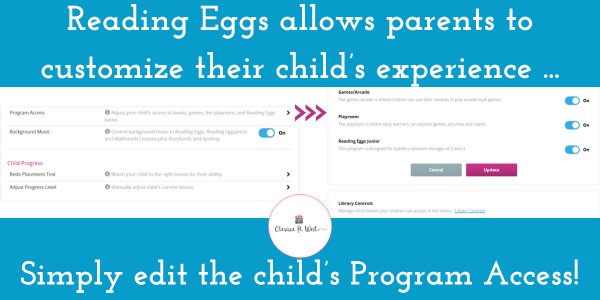
Another reason to like Reading Eggs is that it allows parents to customize the experience to their preferences.
Here’s how:
- Once you sign up, you will gain access to the family dashboard.
- Create accounts for each child.
- If you click on the child’s profile, you will see the option to “edit details”.
- Clicking that will give you several options, including “program access,” where you can adjust your child’s access to books, games, the playroom, etc.
- On the Program Access page, you can toggle a few items on/off.
- At the bottom of that page, you will find the “library controls” link.
- You can restrict access to library titles on the Library Controls page.
Reading Eggs is a secular resource, so I love that parents can be fully responsible for what their child can access and use on the Reading Eggs website! You can get a free 30-day trial with access for up to four children HERE!

Leave a Reply